
In This Article
Somewhere between “just buy the cheapest chair” and “remortgage the house for a Herman Miller” sits a genuinely useful bit of engineering that most shoppers never think to ask about: the office chair synchro tilt mechanism. It sounds like the kind of spec you can safely skip past on your way to the price tag. It isn’t. This one mechanism decides whether your hips open up comfortably when you lean back for a phone call, or whether your knees ride up towards your chin like you’re sat in a deckchair built by someone who’s never actually sat down.
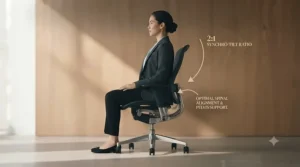
A synchro tilt mechanism (sometimes written synchro-tilt, and closely related to what IKEA calls a synchronised tilt office chair) links the seat and backrest so they move together at a fixed proportion, rather than the backrest flopping backwards on its own while the seat pan stays flat. The result is a recline that keeps your feet on the floor, your eyes roughly level with your screen, and your spine supported through the movement rather than fighting it. On paper this means less slouching. In practice, reviewers across the chairs we researched consistently link it to noticeably less fatigue over an eight-hour day.
This guide walks through seven real, currently available chairs spanning budget to premium, explains how a chair 2:1 tilt ratio actually changes your posture, and digs into the difference between a weight-activated tilt mechanism and a manually tensioned one. Prices below are indicative ranges only — always check current pricing before buying, as retailers adjust these constantly.
Quick Comparison Table
| Chair | Tilt Type | Price Range | Best For |
|---|---|---|---|
| IKEA MARKUS | Synchronised tilt | Under £180 | Tightest budgets |
| Duramont Ergonomic Office Chair | Synchro-tilt with limiter | £180-£250 range | Big and tall users on a budget |
| SIHOO Doro-C300 | 3-position synchro recline | £300-£370 range | Mesh-lovers wanting dynamic lumbar |
| HON Ignition 2.0 | Advanced 2:1 synchro-tilt | £350-£450 range | Best all-round adjustability per pound |
| FlexiSpot C7 | 5-position synchro-tilt | £350-£450 range | Forward-lean typists |
| Steelcase Series 1 | Weight-activated synchro | £450-£550 range | Buyers who want it to just last |
| Branch Ergonomic Chair Pro | 14-point synchro-tilt | Around £500-£600 | Maximum adjustability |
Looking at the spread above, there’s a clear split between chairs that offer a fixed or lightly adjustable synchro tilt mechanism at the budget end, and chairs from around £350 upward that let you fine-tune tension, lock position, and even seat-pan angle independently. If you sit fewer than five hours a day, the cheaper end of this table will likely do the job; if you’re closer to eight-plus hours, the mid-range cluster earns its extra cost through tension control alone. Weight-activated designs like the Steelcase Series 1 remove one variable entirely by adjusting resistance to your body automatically, which matters more the less you enjoy fiddling with knobs.
💬 Just one click — help others make better buying decisions too!😊
Top 7 Office Chairs With a Synchro Tilt Mechanism: Expert Analysis
Every chair below has been assessed against its real specifications and aggregated review sentiment from independent testers and verified buyers. Where hands-on testing data wasn’t publicly available for a specific claim, that’s noted rather than invented.
1. IKEA MARKUS — cheapest genuine synchronised tilt on the high street
The IKEA MARKUS has been a fixture of UK home offices for over a decade, and its synchronised tilt mechanism is the real reason it keeps outselling flashier rivals. IKEA’s own spec sheet confirms this isn’t a basic rocker: the backrest moves through a greater arc than the seat as you recline, opening the angle between torso and thighs rather than just tipping you backwards. Key numbers worth knowing: seat height adjusts between 46-57cm, the frame carries a 10-year guarantee, and the chair is tested to EN 1335 and BIFMA standards, which matters more than it sounds for anyone worried about a wobbly gas lift six months in.
Independent reviewers, including chiropractor-led testing, rate the MARKUS well for build quality and simplicity but flag that the fixed armrests and non-adjustable headrest limit it for taller or shorter-than-average users. This is a chair built to fit a broad middle band of body types rather than to be tailored, so if you’re outside roughly 5’4″-6’2″ it’s worth trying one in-store first. The tilt tension knob under the seat lets you increase resistance for heavier users, though it’s a single dial rather than the multi-point tension systems found further up this list.
Aggregated review sentiment across IKEA’s own listings (thousands of ratings) skews strongly positive, with recurring praise for the tall mesh back and recurring complaints about the fixed armrests pushing users forward at some desks.
Pros:
- ✅ Genuine synchronised tilt mechanism at a genuinely low price
- ✅ 10-year warranty is exceptional for this price bracket
- ✅ Tall mesh backrest suits taller sitters particularly well
Cons:
- ❌ Armrests and headrest are fixed, not adjustable
- ❌ Thin seat cushion can feel firm after several hours
Typically found under £180, the IKEA MARKUS represents strong value if your main need is a working synchro tilt mechanism without extras — just don’t expect it to compete with chairs three times its price on adjustability.

2. Duramont Ergonomic Office Chair — budget pick built for bigger frames
The Duramont Ergonomic Office Chair pairs a synchro-tilt mechanism with a back tilt limiter, meaning you can lock your recline at a chosen angle rather than only choosing between fully upright and fully reclined. Independent lab testing rates its weight capacity around 330lbs (roughly 150kg), and the recline range extends to about 155 degrees when the limiter is disengaged — genuinely generous for a chair in this price bracket. The tilt tension knob sits underneath the seat and, according to comparative testing, offers a wider adjustment range than most rivals nearby in price, even if reviewers note it can feel a touch stiff to reach.
What most buyers overlook here is that the Duramont’s mesh backrest runs the full height of the spine including an integrated headrest, which is unusual at this price point where headrests are often a separate bolt-on afterthought. Reviewers consistently report that shorter users under about 5’4″ find the lumbar support sits too high, while those around 5’8″-6’1″ report the best fit. Armrests adjust for height only, with no forward, backward, or pivot movement, so anyone doing precise keyboard work may want to look further up this list.
Pros:
- ✅ Recline locks at any point up to roughly 155 degrees
- ✅ High weight capacity suits larger or taller users
- ✅ Integrated headrest built into the mesh back, not bolted on
Cons:
- ❌ Armrests adjust height only, no depth or pivot
- ❌ Lumbar position works best for users 5’8″ and above
Sitting in the £180-£250 range, the Duramont Ergonomic Office Chair is worth considering specifically if your previous chair felt too small or under-built — it’s a size-forgiving option that still delivers proper synchronised recline rather than a token wobble.
3. SIHOO Doro-C300 — best mesh chair for dynamic lumbar movement
The SIHOO Doro-C300 takes a slightly different approach to synchro tilt: rather than a stepless recline, it offers three fixed lock positions (roughly 110°, 120°, and 130°) that you toggle between rather than dial freely. On paper this sounds more limiting, but in practice it removes the guesswork of finding “your” tension setting — you simply pick one of three tested angles and the seat and backrest move together to hold it. The chair’s self-adaptive lumbar support is the real headline feature: rather than sitting in a fixed spot, the lumbar pad shifts position as you recline, tracking your centre of gravity so your lower back isn’t left unsupported mid-tilt.
Based on the spec comparison with rivals at a similar price, the Doro-C300’s biggest trade-off is assembly and bulk — reviewers repeatedly mention the box arrives large and heavy (around 23kg), and the build, while sturdy, takes closer to an hour for most people rather than the 15-20 minutes typical of simpler chairs. A common complaint in user reviews is the narrow seat pan, which several outlets flag as unsuitable for wider-framed users, alongside a maximum height that may not suit anyone above roughly 6’2″.
Pros:
- ✅ Self-adjusting lumbar support tracks recline position automatically
- ✅ Three tested lock angles remove tension guesswork
- ✅ Highly adjustable 3D armrests and headrest
Cons:
- ❌ Narrow seat pan unsuitable for wider or taller users
- ❌ Assembly is lengthy due to the chair’s substantial weight
Generally listed in the £300-£370 range, the SIHOO Doro-C300 earns its place for anyone who values dynamic lower-back support over infinite recline adjustability — reviewers consistently rate the lumbar system as the standout feature that justifies the mid-range price.
4. HON Ignition 2.0 — best all-round adjustability for the money
If there’s a textbook example of the classic 2:1 synchro-tilt ratio done properly at a reasonable price, it’s the HON Ignition 2.0. HON’s own engineering documentation confirms the back reclines at a genuine 2-to-1 ratio to the seat angle — for every two degrees the backrest tips back, the seat tilts just one degree, keeping your feet planted and your line of sight roughly level with your monitor throughout the recline. This is the same fundamental geometry used in premium chairs costing two or three times as much.
What most buyers overlook about the Ignition 2.0 is the seat slider, a feature that even some pricier rivals skip entirely. It lets you move the seat cushion forward or backward independently of height, which matters enormously for shorter or longer-legged users trying to get proper thigh support without sacrificing knee clearance. The synchro-tilt itself offers a binary tilt lock (upright or free-float) rather than multiple intermediate stops, which is the one area where cheaper competitors like the Steelcase Series 1’s five-position limiter pull ahead. Reviewers across several independent outlets rate the Ilira-Stretch mesh backrest as noticeably more durable than standard polyester mesh, resisting the sagging and permanent creasing that budget mesh chairs develop within a year.
Pros:
- ✅ Genuine 2:1 synchro-tilt ratio matching premium chair geometry
- ✅ Seat slider adjusts depth independently of height
- ✅ Durable 4-way stretch mesh resists long-term sagging
Cons:
- ❌ Tilt lock is binary — no intermediate recline stops
- ❌ Lumbar panel is thinner than some rivals at this price
Priced typically in the £350-£450 range, the HON Ignition 2.0 is arguably the strongest value pick on this list for anyone who wants textbook synchro-tilt geometry without paying premium-brand prices for the badge.
5. FlexiSpot C7 — best for active, forward-leaning work
The FlexiSpot C7 stands out on this list because its synchro tilt mechanism isn’t limited to backward recline — it also tilts the seat pan forward, a feature usually reserved for chairs costing considerably more. Independent testing describes five locking positions plus a tilt tension knob, and reviewers who tested the forward-tilt function specifically note it noticeably improved posture during focused typing sessions by opening the hip angle beyond 90 degrees, encouraging a more upright spine without conscious effort.
Here’s what the spec sheet won’t tell you, but reviewers note: the lumbar adjustment switch is positioned awkwardly behind the mesh, meaning you often have to reach blindly or stand up to adjust it properly — a genuine usability quirk on an otherwise well-engineered chair. The armrests rotate a full 360 degrees and the seat is notably wide (roughly 51cm at the front), which reviewers rate favourably for larger frames, though this same width can feel oversized for petite users. Assembly is reported as more involved than average, with several reviewers recommending the included video guide rather than the printed instructions alone.
Pros:
- ✅ Forward seat tilt promotes active, upright sitting posture
- ✅ Five lock positions plus adjustable tilt tension
- ✅ Wide seat and 360-degree rotating armrests suit larger frames
Cons:
- ❌ Lumbar adjustment switch is awkwardly positioned
- ❌ Assembly instructions are less clear than the chair deserves
At around £350-£450 depending on whether the optional footrest is included, the FlexiSpot C7 rewards buyers who spend most of their day leaning into focused work rather than reclining back for calls.
6. Steelcase Series 1 — best weight-activated tilt mechanism under £500
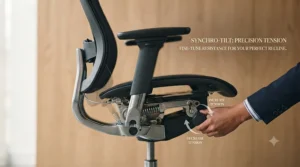
The Steelcase Series 1 brings genuine commercial-grade engineering to a price point most people associate with consumer chairs. Its standout feature for this guide is the weight-activated tilt mechanism: rather than manually setting tension via a knob, the mechanism reads your body weight automatically and adjusts recline resistance accordingly, meaning two different people can share the chair without either needing to recalibrate it. BIFMA Level 3 certification — a genuinely rigorous commercial durability standard — backs this up, alongside a 12-year multi-shift warranty that reflects a build quality rarely seen below the £500 mark.
Based on the spec comparison with the Branch Ergonomic Chair Pro further down this list, the Series 1 trades some adjustability for that durability. The lumbar support is height-adjustable only (no firmness dial), and the seat is foam rather than mesh, so hot-climate sitters or anyone wanting pneumatic lumbar control may find this a limiting factor. What reviewers consistently praise, though, is the synchro-tilt’s precision: the seat rises exactly one degree for every two the backrest reclines, matching the same 2:1 geometry found in the HON Ignition 2.0 but with the added convenience of automatic tension.
Pros:
- ✅ Weight-activated tilt removes manual tension-setting entirely
- ✅ BIFMA Level 3 commercial certification and 12-year warranty
- ✅ 4D armrests adjust height, width, depth, and pivot
Cons:
- ❌ Lumbar support lacks a firmness adjustment dial
- ❌ Foam seat, not mesh, may run warm in summer
Sitting in the £450-£550 range, the Steelcase Series 1 is the chair to choose if you’d rather never think about tilt tension again and simply want a mechanism that adapts to you and lasts a decade or more.
7. Branch Ergonomic Chair Pro — most adjustable synchro-tilt on this list
The Branch Ergonomic Chair Pro offers what the brand describes as 14 points of adjustment, and the synchro-tilt mechanism sits at the centre of that system. Unlike some rivals, the recline can be locked at any reclined position rather than only at fixed stops, and a dedicated forward seat tilt — similar in concept to the FlexiSpot C7’s — lets you lean actively into focused work. Reviewers who compared it directly against the HON Ignition 2.0 rate the Branch’s seat cushion as noticeably thicker and more forgiving over long sessions, though the tilt tension knob reportedly needs around 50 full turns to travel from minimum to maximum, which several testers flagged as excessive.
What most buyers overlook about the “Pro” upgrade specifically is that Branch softened the seat padding compared to the original Ergonomic Chair, and multiple independent reviewers report this softer padding can bottom out around the tailbone during extended sessions — an unusual case of a newer model trading away some comfort for other gains. The 5D armrests offer genuine width, depth, height, and pivot adjustment, though reviewers note some redundancy between the full-arm slide and the separate pad-adjustment mechanism.
Pros:
- ✅ 14 points of adjustment including forward and reverse tilt
- ✅ Recline locks at any angle, not just fixed positions
- ✅ 5D armrests cover height, width, depth, and pivot
Cons:
- ❌ Softer seat padding can bottom out on longer sessions
- ❌ Tension knob requires roughly 50 turns for full range
Typically priced around £500-£600 (availability in the UK is generally via Amazon’s marketplace and the brand’s own shipping options, so it’s worth confirming delivery terms before ordering), the Branch Ergonomic Chair Pro suits buyers who want to tune every variable of their synchro tilt mechanism rather than accept factory defaults.
Practical Usage Guide: Setting Up and Maintaining Your Synchro Tilt Mechanism
Getting a synchro tilt mechanism to actually work for you starts before you even sit down. First, set seat height so your knees sit at roughly 90 degrees with feet flat on the floor — a synchro mechanism can’t compensate for a chair that’s simply too high or low. Next, locate the tension knob (usually underneath the front of the seat) and set it roughly to your body weight: too loose and the backrest will swing away with minimal pressure, too tight and you’ll fight the recline every time you lean back defeating the point of a synchro system entirely.
In the first 30 days, the most common mistake is leaving tension at the factory default. Most chairs ship with a middle-ground setting that suits nobody precisely, so spend your first week adjusting it in small increments after each sitting session until the recline feels supported rather than either floppy or rigid. A second frequent error is locking the tilt fully upright and never using the recline function at all — this defeats the ergonomic purpose of a synchro tilt mechanism, which is specifically designed to encourage movement through the day rather than static, locked sitting.
For ongoing maintenance, check the tilt tension knob and any visible bolts every few months, particularly in the first few weeks after assembly when components settle into place. A synchro mechanism that starts creaking usually needs either a bolt re-tightened or, on gas-lift models, occasional application of a dry lubricant to the pivot points — consult your specific chair’s manual before applying anything, as some finishes react poorly to general household oils.
Real-World Scenarios: Matching Synchro Tilt Chairs to How You Actually Work
Picture three different desks. First, a university student in a shared flat, budget capped around £180, mostly doing essays and the occasional gaming session in the evening — for this person, the IKEA MARKUS or Duramont Ergonomic Office Chair covers the basics without needing the seat slider or forward tilt that a dedicated home-working professional would want.
Second, a hybrid worker doing genuine 7-8 hour desk days three or four times a week, split between focused typing and video calls — this is where a chair like the HON Ignition 2.0 or FlexiSpot C7 earns its higher price, since the seat slider and forward-tilt features respectively address the two distinct postures (upright focus versus reclined conversation) that this working pattern demands.
Third, a full-time remote professional in their mid-30s to 50s who’s already dealt with a bout of lower back discomfort and wants to actively prevent a recurrence — this buyer benefits most from the Steelcase Series 1‘s weight-activated tilt or the Branch Ergonomic Chair Pro‘s lockable recline range, both of which support the kind of frequent, low-effort position changes that occupational health guidance associates with reduced musculoskeletal strain. If this describes your situation, it’s also worth reading the HSE’s guidance on managing back pain at work, which covers practical steps beyond furniture alone.
How to Choose an Office Chair With a Synchro Tilt Mechanism
Picking the right synchro tilt chair comes down to a handful of decision points, roughly in this order of importance:
- Match seat height to your desk, not the other way round. Even the best synchro tilt mechanism can’t fix a chair that puts your wrists at the wrong angle relative to your keyboard.
- Check the tilt ratio if it’s published. A genuine 2:1 seat-to-back tilt ratio, as seen on the HON Ignition 2.0 and Steelcase Series 1, keeps your gaze level with your screen through the recline.
- Decide between manual tension and weight-activated tilt. If you share the chair with a partner or don’t want to fiddle with knobs, weight-activated designs remove that friction entirely.
- Look for a tilt lock, not just free recline. Being able to lock the chair at a chosen angle matters if you want to hold a reclined “thinking” position during calls.
- Confirm the weight capacity against your own weight, with margin. Chairs rated close to their limit tend to feel less supportive well before they technically fail.
- Factor in seat depth adjustment if you’re outside average height. A seat slider, like the one on the HON Ignition 2.0, matters more than most marketing copy suggests.
- Read the warranty length as a proxy for mechanism durability. Longer warranties on the tilt mechanism specifically (not just the frame) tend to correlate with better-engineered synchro systems.
For further detail on general seating standards, Which?’s independent office chair testing is a useful cross-reference against the reviews cited throughout this guide.
Common Mistakes When Buying a Synchro Tilt Office Chair
The single most common mistake is buying on looks alone and only discovering the tilt mechanism is a basic, non-synchronised rocker once the chair arrives — always check the product description specifically states “synchro” or “synchronised” tilt rather than just “reclining” or “tilting,” which can describe much simpler, less supportive mechanisms.
A second frequent error is ignoring tilt tension range entirely. Buyers under roughly 65kg and over 100kg both regularly report that a chair’s tension knob doesn’t travel far enough to suit their weight, leading to a recline that’s either impossible to hold upright or impossible to push back into. Checking a chair’s stated weight range against your own before buying avoids this. Finally, many buyers skip the return policy check — given that a synchro mechanism genuinely needs to be sat in for several days to judge properly, a chair from a retailer with a poor returns window is a real financial risk regardless of how good the specification sheet looks on paper.
Office Chair Synchro Tilt Mechanism vs Other Tilt Mechanisms
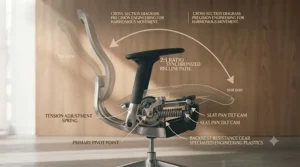
Not every “reclining” office chair uses a synchro system, and the difference matters more than marketing copy usually admits. A basic centre-tilt or knee-tilt mechanism pivots the whole seat and back as one rigid unit from a single point, which typically sits beneath the front of the seat. Lean back on one of these and your hips shift backwards while your feet lift slightly off the floor — fine for occasional use, tiring over a full working day.
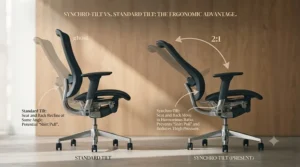
A synchro tilt mechanism, by contrast, uses two separate pivot points working in coordination, so the seat and back move at different rates relative to one another (commonly the 2:1 ratio discussed earlier). The practical difference: your feet stay grounded, your eyeline stays roughly level with your monitor, and your torso opens up rather than folding. Multi-function or “3-way” mechanisms sit somewhere between the two, offering independent seat and back locks but without necessarily linking their motion — you get flexibility, but you have to manually coordinate both angles yourself rather than the chair doing it for you. For anyone doing genuine full-day desk work, the evidence from the reviews surveyed for this guide points consistently toward true synchro systems as the more comfortable long-term option.
Understanding the Seat-to-Back Tilt Ratio (2:1 Explained)
The number quoted most often in synchro tilt marketing is the seat-to-back tilt ratio, and the HON Ignition 2.0’s documentation explains it plainly: for every two degrees the backrest reclines, the seat tilts back just one degree. This asymmetry is deliberate. If the seat tilted at the same rate as the backrest, you’d slide forward every time you reclined, and your knee angle would barely change, offering little of the circulation benefit synchro systems are designed to provide.
A 2:1 ratio instead opens the angle at your hips as you recline, which occupational health literature links to improved blood flow to the legs and reduced pressure on the lower spine during extended sitting. Some premium chairs, including certain Steelcase and Herman Miller mechanisms, use more sophisticated multi-bar linkages that vary the ratio slightly through the recline rather than holding it perfectly fixed, but the underlying principle — back moves more than seat — remains the defining feature of any genuine synchro system, budget or premium.
What to Expect: Real-World Performance of a Synchro Tilt Mechanism
Specs on a page rarely capture what a synchro tilt mechanism actually feels like day to day. In practice, most users report the tilt becomes almost unconscious within the first week — you lean back to think through a problem, the chair follows naturally, and you return upright without needing to physically push yourself. What the spec sheet won’t tell you is how much this depends on correctly set tension: too tight, and the chair feels like it’s fighting you every time you shift; correctly set, and reviewers across nearly every chair in this guide describe the sensation as “disappearing” beneath them.
The other real-world factor rarely mentioned in marketing is noise. Cheaper synchro mechanisms, particularly on budget chairs under roughly £200, can develop an audible creak or click at the pivot points within the first year, especially if bolts aren’t periodically checked. Mid-range and premium mechanisms from brands like HON and Steelcase generally avoid this thanks to tighter tolerances and better-lubricated components from the factory, which is one of the genuine, tangible differences your extra spend buys beyond just adjustability.
Weight-Activated vs Manual Tilt Tension: Which Synchro Mechanism Suits You?
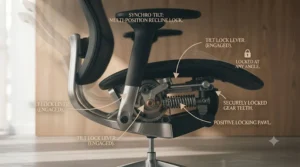
Manual tilt tension, found on the majority of chairs in this guide including the IKEA MARKUS, SIHOO Doro-C300, and Branch Ergonomic Chair Pro, uses a knob or dial that you physically adjust to increase or decrease resistance. The advantage is precise control — once dialled in, it stays exactly where you set it regardless of body weight changes over time. The disadvantage is that setup takes deliberate effort, and shared chairs (a partner, a hot-desk environment) need re-tensioning between users.
A weight-activated tilt mechanism, as used on the Steelcase Series 1, removes that step entirely. Internal springs or cartridges automatically calibrate resistance to whoever’s sitting in the chair, meaning the recline feels appropriately supported for a 55kg user and a 100kg user without either touching a dial. The trade-off, based on the spec comparison across this guide, is typically price — weight-activated systems tend to appear on chairs from roughly £450 upward, reflecting the more complex internal mechanism required. If you’re the sole user of your chair and enjoy fine-tuning, manual tension offers more precise control for less money; if the chair gets shared or you’d simply rather not think about it, weight-activated is worth the premium.
✨ Don’t Miss These Exclusive Deals!
🔍 Take your home office to the next level with a chair that actually supports your workday. Click on any highlighted chair above to check current pricing and availability. A properly specified synchro tilt mechanism is one upgrade your back will thank you for daily!
Safety, Regulations and Compliance for UK Home Offices
If you’re using your chair for work — whether employed or self-employed, in an office or at home — UK law has something to say about it. The Health and Safety (Display Screen Equipment) Regulations require that any chair used for regular screen-based work is stable, allows easy freedom of movement, and is adjustable in seat height with a backrest adjustable in both height and tilt. A genuine synchro tilt mechanism satisfies the tilt requirement more thoroughly than a basic rocker, since it’s specifically designed for controlled, supported adjustment rather than a single fixed lean-back position.
Employers have specific duties under these regulations to assess workstations, including for staff working from home, and HSE guidance confirms these duties don’t disappear simply because the desk is in a spare bedroom rather than an office. If you’re self-employed or buying a chair purely for personal use, the regulations don’t legally apply to you in the same way, but the underlying ergonomic principles — adjustable height, adjustable tilt, adequate freedom of movement — remain sound practical advice regardless of your employment status.
Long-Term Cost & Maintenance of Synchro Tilt Mechanisms
A cheaper chair with a basic tilt mechanism might save you £150 upfront, but if the mechanism fails within two years and needs replacing, the total cost of ownership can end up higher than buying a durable mid-range chair once. Warranty length is a genuinely useful proxy here: the IKEA MARKUS’s 10-year guarantee and the Steelcase Series 1’s 12-year multi-shift warranty both signal manufacturer confidence in the mechanism’s long-term durability, whereas chairs offering only a 1-2 year warranty are implicitly telling you less about how long the tilt system is expected to last.
Ongoing maintenance costs for a synchro tilt mechanism are generally minimal — periodic bolt checks and, rarely, a replacement gas lift cylinder (typically £20-£40 for a compatible part) cover most eventualities. Compare this to the cost-per-use of a £180 chair replaced every 18 months (roughly £0.33 per working day over that period) against a £450 chair lasting eight years (roughly £0.22 per working day) and the long-term value case for investing in a better-engineered synchro system becomes considerably clearer, particularly for anyone sitting most of a working week.
Frequently Asked Questions
❓ What does synchro tilt mean on an office chair?
❓ Is a synchro tilt mechanism better than a standard tilt chair?
❓ How do I adjust the tension on a synchro tilt office chair?
❓ Can a synchro tilt mechanism be repaired if it breaks?
❓ What is a weight-activated tilt mechanism?
Conclusion
An office chair synchro tilt mechanism isn’t a marketing flourish — it’s genuinely the difference between a chair that fights your body through a long day and one that quietly supports it. Across the seven chairs in this guide, the pattern holds regardless of price: the ones reviewers consistently rate highest for comfort are the ones where the tilt geometry, whether a simple synchronised tilt on the IKEA MARKUS or a weight-activated system on the Steelcase Series 1, actually does what it claims rather than offering the feature in name only.
If your budget tops out around £200, the IKEA MARKUS or Duramont Ergonomic Office Chair deliver a legitimate synchro tilt experience without the extras. Stretching to £350-£450 buys genuinely useful refinements — the HON Ignition 2.0‘s textbook 2:1 ratio and seat slider, or the FlexiSpot C7‘s forward-tilt for active sitting. And for anyone treating their chair as a decade-long investment, the Steelcase Series 1 and Branch Ergonomic Chair Pro both justify their higher price through mechanism precision and adjustability that budget chairs simply can’t match. Whichever you choose, the core advice stands: check the tilt ratio, set your tension properly in the first week, and don’t ignore the mechanism just because it’s the least Instagrammable part of your new chair.
Recommended for You
- Office Chair With 4D Armrests: 7 Best Picks Tested for 2026
- Best Office Chair Dynamic Lumbar Support: 7 Picks for 2026
- Office Chair Adjustable Lumbar Support: 7 Best Picks 2026
Disclaimer: This article contains affiliate links. As an Amazon Associate, I earn from qualifying purchases. If you purchase products through these links, we may earn a small commission at no additional cost to you.
✨ Found this helpful? Share it with your friends! 💬🤗
